The short answer
Makeblock mBot is the block-coding kit graded 8+, Kids First Coding & Robotics codes with cards and no screen from 4, and the 4M Table Top Robot is the budget build graded 8+.
Our verdict
Our Top Picks
A robotics kit is a robot your child builds first, and five of the eight below can then be programmed. They run from a card-coded robot graded from 4 to an Arduino-capable tank kit, and each review gives the maker’s age grade, the power source and the warnings printed by the maker or on the Amazon listing; the table shows which kits need a phone, tablet or computer.
Robot kit finder
Find the right robotics kit
Pick a kind of kit and a price tier. The suggestion is our editorial starting point, drawn from the eight kits below, not a test result.
Tiers are relative to the kits in this guide; live prices are in the comparison table below.
Compare the picks
Compare the 8 Robotics Kits
 Makeblock mBotBlock-Coding Robot KitCoding app, big kidsBlocks/ArduinoMaker 8+$69.99
Evidence: TechGearLab, this exact model
 Kids First Coding & RoboticsScreen-Free Starter KitScreen free, young kidsCode cardsMaker 4 to 8$126.74 Prime
Evidence: Geeks Under Grace, this exact model, maker-sent copy
 4M Table Top RobotBudget Crab RobotSimple build, big kidsNo codingMaker 8+$11.89 Prime
Evidence: maker specs only, no independent test
 Sillbird Solar Robot 12-in-1Solar Build KitSolar, simple build, big kidsNo codingMaker 8+$19.99
Evidence: TechGearLab, a Sillbird STEM 12-in-1 solar kit; model not named
 Teach Tech Mech-5Mechanical Coding RobotScreen free, tweensCoding wheelMaker 10+$26.11 Prime
Evidence: maker specs only, no independent test
 T&K Smart MachinesApp-Coded Robot SetCoding app, big kidsVisual appMaker 8+$99.99
Evidence: maker specs only, no independent test
 Snap Circuits R/C Snap RoverElectronics Rover KitElectronics, big kidsNo codingMaker 8+$98.05 Prime
Evidence: maker specs only, no independent test
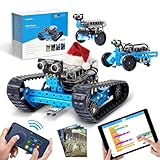 Makeblock mBot RangerAdvanced 3-in-1 KitCoding app, big kids, tweensBlocks/ArduinoMaker 8+$169.99
Evidence: Maker Hacks, this exact model, maker-sent copy
Which Robotics Kit for Which Age?
- Ages 4 to 7: Kids First Coding & Robotics is graded 4 to 8; Thames & Kosmos says it suits “a child as young as four years with help from an adult”. Makeblock’s FAQ says the mBot suits children “as young as 6”, but its guide and listing say 8+. For a ready-made screen-free coding robot, see our STEM toys guide.
- Ages 8 and 9: mBot, Smart Machines, Snap Rover, the Table Top Robot and the Sillbird kit carry 8+ maker grades; Amazon’s listing grades the Sillbird kit 10 and up, and a tile on Thames & Kosmos’ site labels Smart Machines “Ages 11+”.
- Ages 10 and up: Mech-5 is graded 10+, and Amazon’s listing grades the mBot Ranger 10+ (Makeblock says 8 and up).
- Teens (our suggestion): mBot and Ranger can be programmed in the Arduino language; for bare Arduino boards, see our Arduino kits page.
For a robot that arrives built, see our AI robot companions.
How We Picked These Robot Kits
How this guide was built
built from manufacturer documentation, published third-party reviews and owner reports; we have not tested these products ourselves.
What we checked on each kit
- Fit for kids: the maker’s age grade, quoted, and the maker’s or a named reviewer’s reason the kit suits that age.
- What it needs: batteries, tools, and any phone, tablet, computer or account, in the maker’s words.
- Safety: the warnings from the maker or the Amazon listing, quoted; CPSC’s recall database searched for every product and maker on November 17, 2026.
- Price and stock: in stock on Amazon on November 17, 2026, sold by Amazon.com, the brand’s own store, or a seller at or below the maker’s list price.
Sources and independence and what parents on Reddit asked
Sources and independence
TechGearLab’s robot kit guide, updated March 16, 2025, tested the mBot and a Sillbird 12-in-1 solar kit without naming its model. Geeks Under Grace reviewed Kids First Coding & Robotics and Maker Hacks the mBot Ranger, each on a copy the maker sent. A web search found no written independent review of the other four; their reviews rest on maker pages and manuals.
What parents on Reddit asked
In an r/robotics thread started July 26, 2024, a parent asked for “a good intro robotics set that has some compatibility with lego that an 8 year old can work with”. One reply recommended the mBot Ranger as “compatible with LEGO”; another commenter answered: “I’m not seeing any photos or links showing that compatibility.” Makeblock’s own spec table lists “LEGO bricks” under compatibility for both the mBot and the Ranger.
Detailed Reviews
Makeblock mBot, Block-Coding Robot Kit
Parents of a child 8 or older who wants to build a robot car and then code it; Makeblock calls it a kit "perfect for beginners."
$69.99 from AmazonAs of Nov 18, 17:16 UTCVerdict
A metal-frame robot car with line-following and ultrasonic sensors, programmed in blocks or Arduino code.
Evidence: Independently reviewed, exact model. TechGearLab: Makeblock mBot, colour not stated.
TechGearLab calls it “an excellent introductory robotics kit that balances affordability with hands-on learning”, while noting it requires “dexterity for screw-based assembly and often adult help” and listing “Struggles on non-smooth floors”. Makeblock says to “Assemble mBot in just 15 minutes and start coding within the hour!” It is controlled with three free Makeblock apps and coded in mBlock, which Makeblock says “is available for multiple devices and systems such as Windows, Mac, Linux, iOS, and Android.” The listing warns: “CHOKING HAZARD” and “Small parts. Not for children under 3 years of age.” The remote takes a CR2025 coin cell; we found no coin-battery warning on Makeblock’s pages, so see CPSC’s warning below.
Specs (linked: Makeblock mBot, blue, 90053)
- Coding: “block-based and Arduino” (Makeblock)
- Power: 4 AA in the robot, CR2025 in the remote, not included (listing)
- Age: 8+ (Makeblock guide and listing); Makeblock’s FAQ says “as young as 6”
Pros
- Block coding with a path to Arduino code (Makeblock)
- Works with “LEGO bricks” (Makeblock spec table)
Cons
- Screw-built frame often needs adult help (TechGearLab)
- Customising needs add-on packs (TechGearLab)
Who should buy it
Parents of a child 8 or older who wants to build a robot car and then code it; Makeblock calls it a kit “perfect for beginners.”
Kids First Coding & Robotics, Screen-Free Starter Kit
Parents of a child aged 4 to 8 who wants to start coding without a screen; Thames & Kosmos built it for "grades K-2".
$126.74 from AmazonAs of Nov 18, 17:16 UTCVerdict
A robot that reads physical code cards, with six storylines and 30 lessons, and no screen.
Evidence: Independently reviewed, exact model. Geeks Under Grace: Kids First Coding & Robotics, review copy from Thames & Kosmos.
Geeks Under Grace (January 11, 2025, on a review copy from Thames & Kosmos) calls it “a STEM kit for early grade schoolers” but found “the cardboard components are prone to severe warping”. Thames & Kosmos says “No tablet required: simply lay down physical code cards, and an optical scanner reads them” and that the lessons suit “a child as young as four years with help from an adult and as old as eight years.” The manual says children “will likely need help from a parent or adult” and that “An adult must insert and replace the batteries inside the robotic base unit.” It warns: “WARNING! Not suitable for children under 3 years. Choking hazard — small parts may be swallowed or inhaled.”
Specs (linked: Kids First Coding & Robotics, 567012)
- Pieces: 417; lessons: 30 (Thames & Kosmos)
- Power: 3 AA, not included (manual)
- Age: 4 to 8 (Thames & Kosmos)
Pros
- Codes with cards, no app or device (Thames & Kosmos)
- Parents’ Choice Gold Award, 2018 (Thames & Kosmos)
Cons
- Map tiles warped in one reviewer’s set (Geeks Under Grace)
- Younger children need an adult alongside (manual)
Who should buy it
Parents of a child aged 4 to 8 who wants to start coding without a screen; Thames & Kosmos built it for “grades K-2”.
4M Table Top Robot, Budget Crab Robot
Parents of a child 8 or older who wants a quick first robot build; 4M lists a 2014 Parents' Choice Approved award.
$11.89 from AmazonAs of Nov 18, 17:16 UTCVerdict
A small motorised crab that walks to a table edge and turns away.
Evidence: No independent test; maker specs. Source: 4M’s product page and manual.
4M describes “a smart robotic crab which could detect the edges of any platform and make swift turns to avoid falling off.” The manual says “This kit is intended for children 8 years or older”, that “Adult supervision and assistance are required at all times”, and that “This kit and its finished product contain small parts which may cause choking if misused. Keep away from children under 3 years old.” It needs one AA battery and a small crosshead screwdriver; the listing’s description says AAA, but its bullets and 4M’s manual say AA.
Specs (linked: 4M Table Top Robot, 5576)
- Power: 1 AA, not included (4M manual)
- Tools: small crosshead screwdriver (4M manual)
- Age: 8+ (4M manual)
Pros
- One-battery build with no app (4M)
Cons
- No coding or remote; it only walks and turns
- No independent review found
Who should buy it
Parents of a child 8 or older who wants a quick first robot build; 4M lists a 2014 Parents’ Choice Approved award.
Sillbird STEM Solar Robot 12-in-1, Solar Build Kit
Parents of a child 8 or older curious about solar power; Sillbird says "each model is made for builders aged 8–12."
$19.99 from AmazonAs of Nov 18, 17:16 UTCVerdict
A 190-part kit with one solar panel and motor that builds 12 models.
Evidence: Independently reviewed, same series. TechGearLab: Sillbird STEM 12-in-1, model and colour not stated.
TechGearLab tested a Sillbird 12-in-1 solar kit and calls it “a very inexpensive but limited solar-powered kit”: “you can’t control this robot at all”, the gearbox assembly “is also difficult”, and it “Requires lots of adult assistance to set up”. Sillbird sells several 12-in-1 solar kits; TechGearLab names no model. Sillbird lists a “battery-powered mode” but no battery type on its page. The listing warns: “Choking Hazard” and “Small Parts. Not For Children Under 3 Yrs.” The seller is Fantasy US Store, a third party, at a price below Sillbird’s own on November 17, 2026.
Specs (linked: Sillbird STEM Solar Robot R121, grey)
- Parts: 190 (Sillbird)
- Age: “8+ years” (Sillbird); “10 years and up” (Amazon field)
Pros
- Runs on sunlight or a bright lamp (listing)
Cons
- Cannot be steered or coded (TechGearLab)
- Fiddly gearbox build (TechGearLab)
Who should buy it
Parents of a child 8 or older curious about solar power; Sillbird says “each model is made for builders aged 8–12.”
Teach Tech Mech-5, Mechanical Coding Robot
Parents of a child 10 or older who wants to code without a screen; Elenco calls it "your very first coding robot."
$26.11 from AmazonAs of Nov 18, 17:16 UTCVerdict
A robot coded by snapping buttons onto a wheel, with no computer or app.
Evidence: No independent test; maker specs. Source: Elenco’s product page and manual.
Elenco calls Mech-5 “‘unplugged’ – a new concept of coding without a computer or app”, working up to tasks “like throwing, lifting, kicking or drawing”. The manual lists a diagonal cutter, screwdriver, ruler, marker and safety glasses as tools, says battery changes “should be carried out by an adult or under adult supervision”, and warns: “For safety concern, users should not use any dangerous materials as throwing object, such as steel balls or sharp items.” Elenco warns: “WARNING CHOKING HAZARD- Small parts. Not for Children under 3 yrs.” The listing adds two warnings headed “CHOKING HAZARD”: “Toy contains a small ball. Not for children under 3 yrs. To be used under the direct supervision of an adult” and “This toy is a marble. Not for children under 3 yrs.”
Specs (linked: Teach Tech Mech-5, TTC-895)
- Power: 2 AAA (Elenco)
- Age: 10+ (Elenco)
Pros
- Screen-free coding for older kids (Elenco)
Cons
- Needs cutters and a screwdriver (manual)
- No independent review found
Who should buy it
Parents of a child 10 or older who wants to code without a screen; Elenco calls it “your very first coding robot.”
Thames & Kosmos Robotics: Smart Machines, App-Coded Robot Set
Parents of a child over 8 with a compatible tablet who likes animal-style machines; it won a 2016 Parents' Choice Gold Award (Thames & Kosmos).
$99.99 from AmazonAs of Nov 18, 17:16 UTCVerdict
Eight motorised models driven by an ultrasonic sensor and a visual coding app.
Evidence: No independent test; maker specs. Source: Thames & Kosmos’ product page and manual.
Thames & Kosmos calls it a “simple, fun introduction to robotics” with a bipedal robot, a beetle and a crocodile among the eight builds. It “Requires a tablet or smartphone running iOS or Android”; the manual says iOS devices “must support Bluetooth 4.0 (BLE)” and Android devices also need “location services must be enabled.” The manual warns: “WARNING: This toy is only intended for use by children over the age of 8 years, due to accessible electronic components.”, “WARNING. Not suitable for children under 3 years. Choking hazard — small parts may be swallowed or inhaled.” and “WARNING. Do not aim at eyes or face.” A related-products tile on Thames & Kosmos’ site labels it “Ages 11+”; its product page says 8+.
Specs (linked: Thames & Kosmos Robotics: Smart Machines, 620375)
- Pieces: 230; models: 8 (Thames & Kosmos)
- Power: 3 AA (manual)
- Age: 8+ (Thames & Kosmos); a site tile says 11+
Pros
- Sensor-driven models coded on a tablet (Thames & Kosmos)
Cons
- Needs a Bluetooth 4.0 phone or tablet
- No independent review found
Who should buy it
Parents of a child over 8 with a compatible tablet who likes animal-style machines; it won a 2016 Parents’ Choice Gold Award (Thames & Kosmos).
Snap Circuits R/C Snap Rover, Electronics Rover Kit
Parents of a child 8 or older who wants to learn electronics; Elenco says the kit lets kids "create rovers and other fun devices by snapping together working circuitry".
$98.05 from AmazonAs of Nov 18, 17:16 UTCVerdict
A remote-control rover whose circuits a child snaps together, with over 40 other experiments.
Evidence: No independent test; maker specs. Source: Elenco’s product page and manual.
Elenco says the kit offers “a fun, hands-on education in electronics, allowing kids to create rovers and other fun devices by snapping together working circuitry”, and “No Soldering is required.” The manual warns: “WARNING: SHOCK HAZARD” and “Never connect Snap Circuits® to the electrical outlets in your home in any way!” and “Batteries are harmful if swallowed, so keep away from small children.” Elenco’s page warns: “WARNING CHOKING HAZARD- Small parts. Not for Children under 3 yrs.” The listing adds a warning headed “CHOKING HAZARD” and “WARNING:”: “This product contains small magnets. Swallowed magnets can stick together across intestines causing serious infections and death. Seek immediate medical attention if magnets are swallowed or inhaled.” Elenco’s page and manual carry no such warning; the manual says the motor shell “has a magnet on it”. Our smart toys guide lists more builds.
Specs (linked: Snap Circuits R/C Snap Rover, SCROV-10)
- Power: 6 AA in the rover, 9V in the remote, not included (Elenco)
- Age: 8+ (Elenco)
Pros
- Snap-together circuits that drive a rover (Elenco)
Cons
- Seven batteries, none included (Elenco)
- No independent review found
Who should buy it
Parents of a child 8 or older who wants to learn electronics; Elenco says the kit lets kids “create rovers and other fun devices by snapping together working circuitry”.
Makeblock mBot Ranger, Advanced 3-in-1 Kit
Parents of a child 8 or older (Makeblock; 10+ on the listing) ready for a bigger build who wants to code a tank or balancing robot; Makeblock calls it "an advanced version of mBot."
$169.99 from AmazonAs of Nov 18, 17:16 UTCVerdict
One kit that builds a tank, a self-balancing robot or a three-wheel racer, coded in blocks or Arduino.
Evidence: Independently reviewed, exact model. Maker Hacks: Makeblock mBot Ranger, kit sent by Makeblock.
Makeblock calls it “perfect for kids aged 8 and up who want to create, play, and learn”, and says it “supports block-based programming and Arduino IDE”. Amazon’s listing grades it 10 years and up. Maker Hacks, reviewing a kit Makeblock sent, says it “offers a high-quality and engaging learning experience for children aged 10 and up”, adds “Kids will need a hand in some areas and expect builds to take around an hour”, and says “it is not the cheapest out there”. It takes six AA batteries; Makeblock says “No AA batteries are included in this kit.” The listing warns: “Small parts:Not for children under 3 yrs.”
Specs (linked: Makeblock mBot Ranger 3-in-1, 90092)
- Power: 6 AA, not included (Makeblock)
- Age: 8 and up (Makeblock); 10+ (listing)
Pros
- Three robot forms from one kit (Makeblock)
Cons
- Premium price within this guide
- Rechargeable battery pack costs extra (Maker Hacks)
Who should buy it
Parents of a child 8 or older (Makeblock; 10+ on the listing) ready for a bigger build who wants to code a tank or balancing robot; Makeblock calls it “an advanced version of mBot.”
Small Parts, Batteries and Apps: What the Makers Say
The CPSC says the CPSIA “made ASTM F963 a mandatory consumer product safety standard for children’s toys.” We found no maker statement naming ASTM F963 for any of the eight; Elenco’s Snap Rover manual says it “Conforms to all applicable U.S. government requirements”. Each of the eight carries a small-parts warning for under-3s from its maker or listing.
The mBot remote uses a CR2025 coin cell. The CPSC warns: “A button cell battery can burn through a child’s throat or esophagus in as little as two hours if swallowed.” If a child may have swallowed one, CPSC says to call “the National Battery Ingestion Hotline (800-498-8666) or the Poison Help Line (800-222-1222) immediately”. CPSC adds: “Toys with button cell or coin batteries are required to have a secure closure requiring a screwdriver, coin or tool to open.” We found no statement from Makeblock on how the remote’s battery cover closes. For questions about a younger sibling and small parts or magnets, ask your pediatrician.
Apps: Smart Machines needs an iOS or Android device; the two Makeblock kits are coded in Makeblock’s apps or mBlock. Makeblock’s terms say “You must be at least 18 years old to create an account or agree to these Terms” and that “Individuals under 18(or under the legal age of majority in your jurisdiction) may only use the Service under the direct supervision of a parent, legal guardian, or educator.” The Makeblock pages we read do not say whether coding either kit needs an account. We left out Apitor’s robots, which are coded through Apitor’s app: in September 2025 in announcing a settlement, Christopher Mufarrige, director of the FTC’s Bureau of Consumer Protection, said “Apitor allowed a Chinese third party to collect sensitive data from children using its product, in violation of COPPA” (CyberScoop); Apitor “did not admit or deny the allegations”.
A search of CPSC’s recall database on November 17, 2026 found no recall for any of the eight kits, and none at all for Thames & Kosmos, Makeblock, Sillbird or Elenco. Toysmith, named as maker on the 4M listing, has four recalls of unrelated toys (1994 to 2019).
Frequently Asked Questions
Q. What is the best starter robotics kit for kids?
It depends on age. TechGearLab calls the mBot “an excellent introductory robotics kit”, and Makeblock grades it 8+; for ages 4 to 8, our suggestion is Kids First Coding & Robotics, which needs no screen.
Q. What is the best robot kit for kids to build?
Our suggestion: the 4M Table Top Robot for a short first build, Mech-5 for a longer one at 10+, and the Sillbird kit for 12 solar models.
Q. What is the best educational robot kit for kids?
Thames & Kosmos aligns Kids First’s lessons to “CSTA, ISTE, and Code.org standards”; Makeblock offers “12+ Free Basic Courses” for the mBot. Neither is an independent test.
Q. What is a good robotics kit for a 10-year-old?
Mech-5 is graded 10+, and the mBot Ranger is graded 8 and up by Makeblock and 10+ on Amazon. Our suggestion: a 10-year-old new to coding may start with the mBot.
The bottom line
Final Verdict
Makeblock mBot (check price) for block coding at 8 and up, Kids First Coding & Robotics (check price) for screen-free coding from 4, and the 4M Table Top Robot (check price) for a budget first build.
Product prices and availability are accurate as of the date/time indicated and are subject to change. Any price and availability information displayed on Amazon.com at the time of purchase will apply to the purchase of this product.